

Tokenization: charge saved payment methods
July 30, 2026
Tokenization with FlowAlp Pay: save a payment method at checkout (preAuthorization) and charge it later server-side — flexible, PCI-friendly billing.
Tokenization stores a customer's payment method as a reusable token during a normal checkout. From then on you can charge that customer server-side — with any amount, at any time — without sending them back to a payment page. Sensitive card data never touches your systems: FlowAlp Pay keeps it, you keep only IDs.
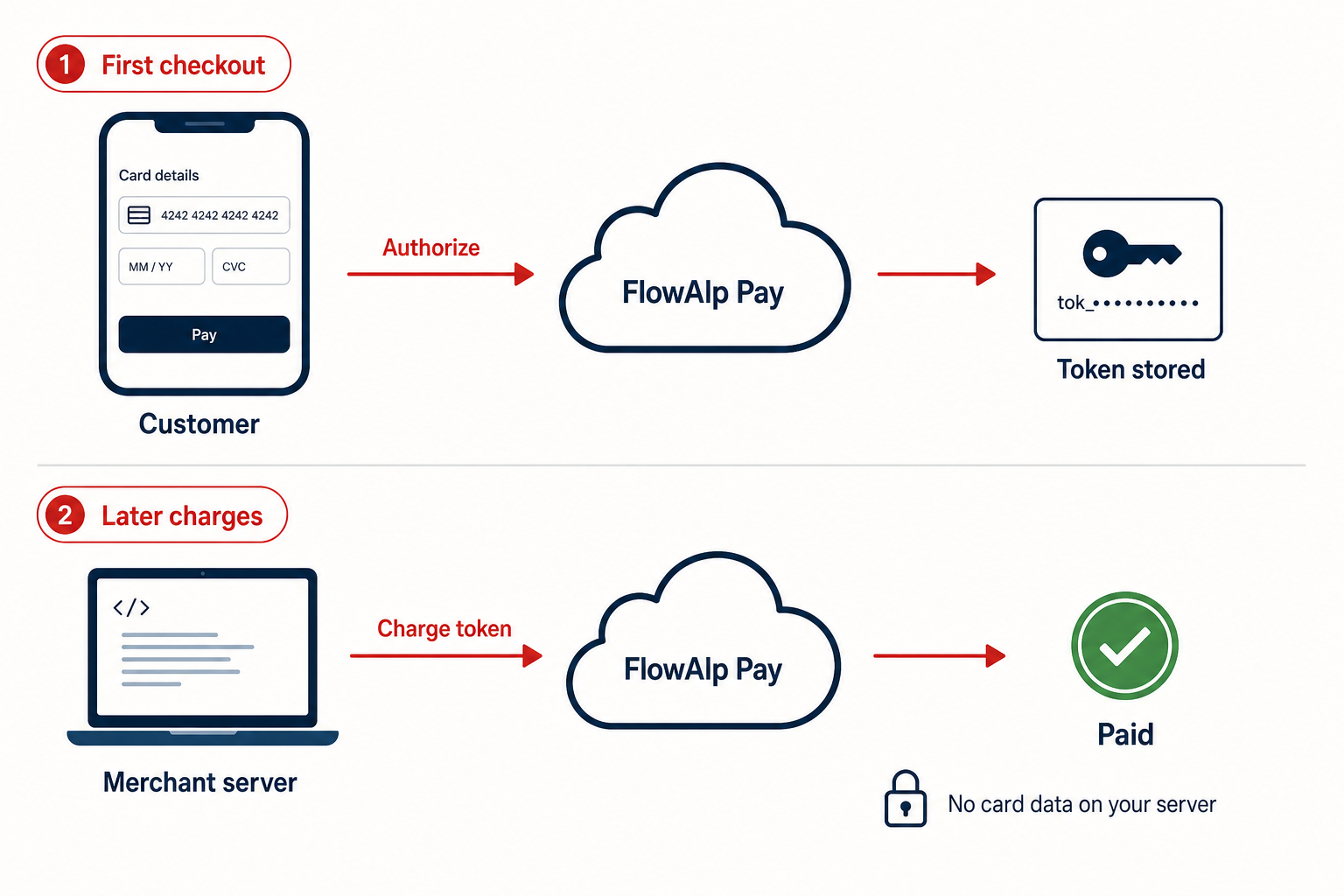
How tokenization works
- Create a Gateway with
"preAuthorization": true. The customer goes through the usual hosted checkout, but instead of a debit only the payment method is registered. - The transaction receives the status
authorized— delivered through the transaction webhook, including the transaction ID. - Whenever you need to collect money, charge that transaction ID via the Transaction endpoint with an amount of your choice.
- Each charge creates a new transaction (
confirmedon success) that points back to the token viapreAuthorizationId.
Tokens do not expire and can be charged any number of times with any amount. Unlike a pre-authorization, however, no funds are blocked — a charge can fail (expired card, insufficient funds), so your code must handle failures.
Not every payment provider supports tokenization. Whether the option is available depends on your account configuration.
Save a payment method at checkout
Set preAuthorization to true when creating the Gateway. During a plain tokenization the amount is not debited — the checkout only registers the payment method. If the first payment should be collected right away, additionally set chargeOnAuthorization to true.
curl -X POST "https://api.pay.flowalp.com/v1.16/Gateway/?instance=demo-shop" \
  -H "x-api-key: $FLOWALP_API_SECRET" \
  -H "Content-Type: application/json" \
  -d '{
    "amount": 2990,
    "currency": "CHF",
    "purpose": "Save payment method",
    "referenceId": "CUST-55021-SETUP",
    "preAuthorization": true,
    "chargeOnAuthorization": true,
    "successRedirectUrl": "https://app.example.com/billing/success",
    "failedRedirectUrl": "https://app.example.com/billing/failed",
    "cancelRedirectUrl": "https://app.example.com/billing/cancel"
  }'
When the webhook reports the status authorized, store the transaction ID together with your customer record — it is the handle for all future charges. You can also read it by retrieving the Gateway.
Charge the token server-side
A later charge is a single POST against the stored transaction ID — no customer interaction required. The amount is free, in minor units:
curl -X POST "https://api.pay.flowalp.com/v1.16/Transaction/98123/?instance=demo-shop" \
  -H "x-api-key: $FLOWALP_API_SECRET" \
  -H "Content-Type: application/json" \
  -d '{
    "amount": 1490,
    "purpose": "Usage fees July",
    "referenceId": "CUST-55021-2026-07"
}'<?php
use FlowAlpPay\FlowAlpPay;
use FlowAlpPay\Models\Request\Transaction;
$client = new FlowAlpPay(
getenv('FLOWALP_TENANT'),
getenv('FLOWALP_API_SECRET'),
FlowAlpPay::DEFAULT_COMMUNICATION_HANDLER,
'pay.flowalp.com',
'1.16'
);
$charge = new Transaction();
$charge->setId(98123); // transaction with status "authorized"
$charge->setAmount(1490); // CHF 14.90
$charge->setPurpose('Usage fees July');
$charge->setReferenceId('CUST-55021-2026-07');
$response = $client->charge($charge);Every successful charge shows up as a new confirmed transaction in your webhooks, with preAuthorizationId pointing back to the token. Monitor failed charges and retry or contact the customer. All endpoint parameters are documented in Charge, capture, refund and cancel Transactions.
Security and PCI scope
- Card and account data are entered only on the FlowAlp Pay checkout and stay on the platform — your database holds customer IDs and transaction IDs, nothing card-related.
- Keep the API secret strictly in your backend and rotate it if it may have leaked: whoever holds it could charge stored tokens.
- Verify webhook signatures before recording a charge as successful.
Tokenization or subscriptions?
Use tokenization when amounts or intervals vary: usage-based billing, one-click reorders, adding charges to an open tab, or self-managed recurring logic where you decide when to charge and how to react to failures and cancellations. Use subscriptions when a fixed amount recurs at a fixed interval and FlowAlp Pay should debit the customer automatically — see Subscriptions and recurring payments.
Next step: look up all charge parameters in the Transactions reference, or switch to subscriptions if your billing is strictly periodic.