

FlowAlp Pay overview
July 30, 2026
FlowAlp Pay overview: hosted checkout, pay links and QR codes, shop plugins, REST API and POS for accepting TWINT, cards and wallets in Switzerland.
FlowAlp Pay is FlowAlp's Swiss payment platform for accepting payments online and in person. A single merchant account gives you a hosted checkout, pay links and QR codes, ready-made shop plugins, a REST Merchant API, and point-of-sale (POS) options — with Swiss payment methods such as TWINT alongside international cards and wallets.
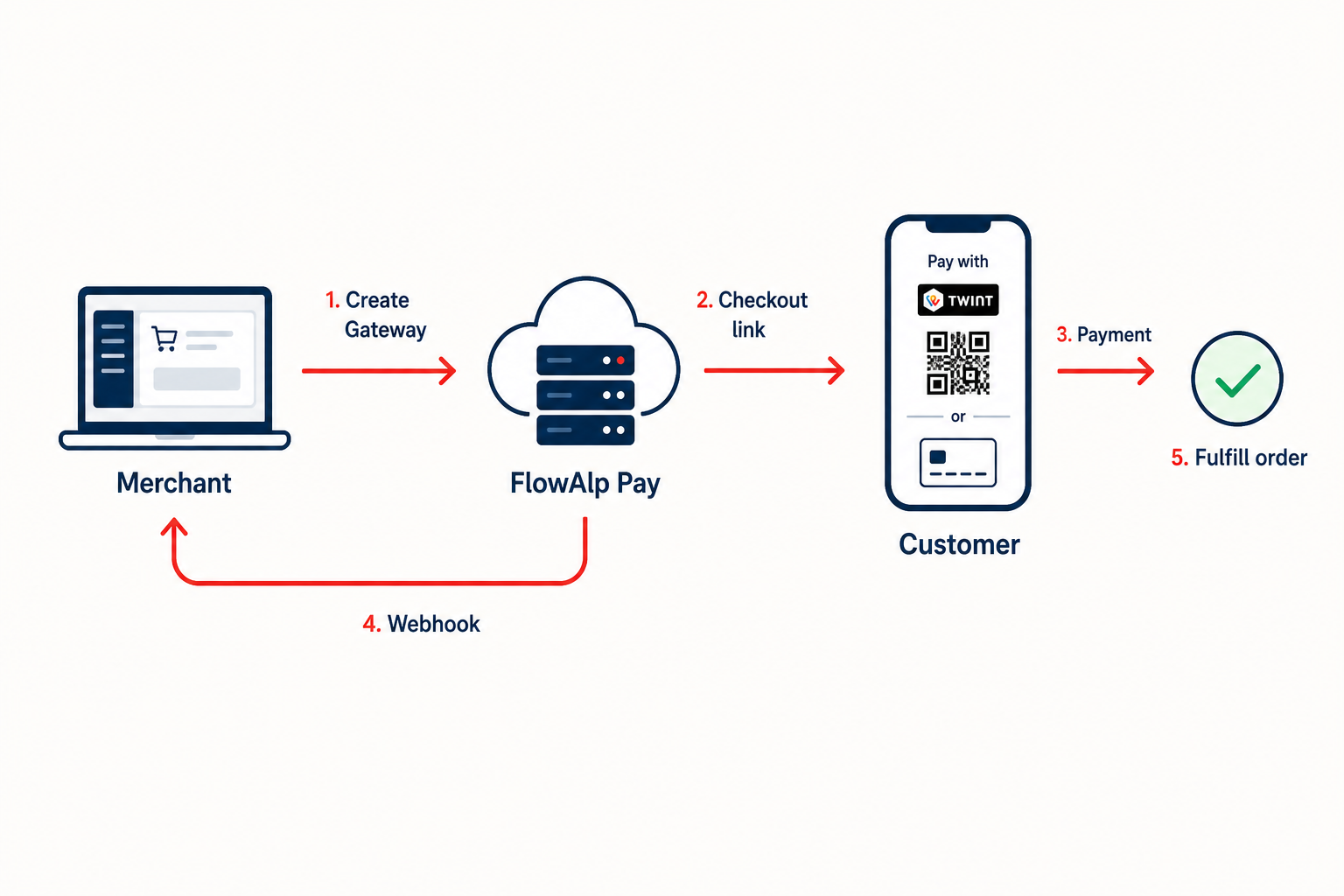
This documentation serves two audiences: merchants who want to get paid with little or no setup, and developers who integrate payments into websites, shops, and apps. Every capability below links to a dedicated guide.
What FlowAlp Pay offers
| Capability | What it does |
|---|---|
| Hosted checkout (Gateway) | A ready-made payment page created per order through the Merchant API. Customers are redirected to it or see it embedded in your site. |
| Pay links and QR codes | Shareable payment links and QR codes created in the dashboard — no code required. |
| Plugins | Prebuilt integrations for e-commerce platforms, CMS, and business software. |
| Merchant API | REST API to create checkouts and manage transactions, subscriptions, refunds, and payouts. |
| POS | In-person payment options; availability depends on your account configuration. |
Payment methods include TWINT, Visa, Mastercard, American Express, PostFinance, Apple Pay, Google Pay, PayPal, and Klarna. Which methods you can offer depends on your account configuration — see Activate payment methods.
Core concepts
| Concept | Meaning |
|---|---|
| Instance | The technical identifier of your merchant account. It appears in your payment page domain and as the instance query parameter on every API request. |
| Gateway | A checkout session created through the API for one specific payment. |
| Dashboard | The merchant back office where you configure payment methods, tools, API keys, and webhooks. |
| Webhook | A server-to-server notification that tells your system about payment status changes. |
| Payout | The settlement transfer of collected funds to your bank account. |
Read more about the instance in Instance name.
Two ways to integrate
For merchants (no or low code)
- Create your account and activate payment methods.
- Create pay links and QR codes directly in the dashboard and share them by e-mail, chat, invoice, or printout.
- If you run a shop system, install a plugin — start with the e-commerce integrations overview or the WooCommerce guide.
For developers (REST API)
- Look up your instance name and create API credentials.
- Send your first API request to verify the setup.
- Create a Gateway and send your customer to the hosted checkout, or embed it — see the checkout embedding overview.
- Process results server-side with webhooks and signature verification.
- Test everything in test mode and work through the go-live checklist.
Explore the documentation
- Getting started — Choose an integration, Create your account, API credentials
- Payments — Accept a one-time payment, Pay links and QR codes, Subscriptions
- Checkout — Embedding overview (redirect, iFrame, modal, mobile)
- API reference — Merchant API overview, Authentication, Create a Gateway
- Webhooks — Configure webhooks, Verify webhook signatures
- Payouts — Payouts and reconciliation
- Integrations — E-commerce, CMS, Business software, Other integrations
- Testing — Testing for developers, Test cards and scenarios, Go-live checklist
- SDKs — PHP SDK
Key URLs
| Purpose | URL |
|---|---|
| Dashboard and sign-up | https://pay.flowalp.com |
| Your tenant (sign-in and payment pages) | https://tenantname.pay.flowalp.com |
| Merchant API | https://api.pay.flowalp.com/v1.16/ |
The Merchant API supports versions v1.14, v1.15, and v1.16; new integrations should use v1.16. See API versions and changelog.
New to FlowAlp Pay? Create your account and follow Choose an integration. Developers can jump straight to Your first API request.