

Accept a one-time payment
July 30, 2026
Accept one-time payments with FlowAlp Pay: create a Gateway, redirect to the hosted checkout, confirm via webhook and fulfill the order safely.
A one-time payment is the default payment type on FlowAlp Pay: the customer pays once and the amount is debited immediately. The most flexible way to accept it is the Gateway of the Merchant API — your backend creates a payment session, FlowAlp Pay hosts the checkout, and a webhook tells your system when the money has arrived. This guide covers the full flow, from Gateway creation to order fulfillment.
Prerequisites
- A merchant account — sign up at signup.pay.flowalp.com and log in at login.pay.flowalp.com
- At least one active payment method — see Activate payment methods
- Your instance name and API credentials
- Optional: the PHP SDK if your backend runs PHP
How the flow works
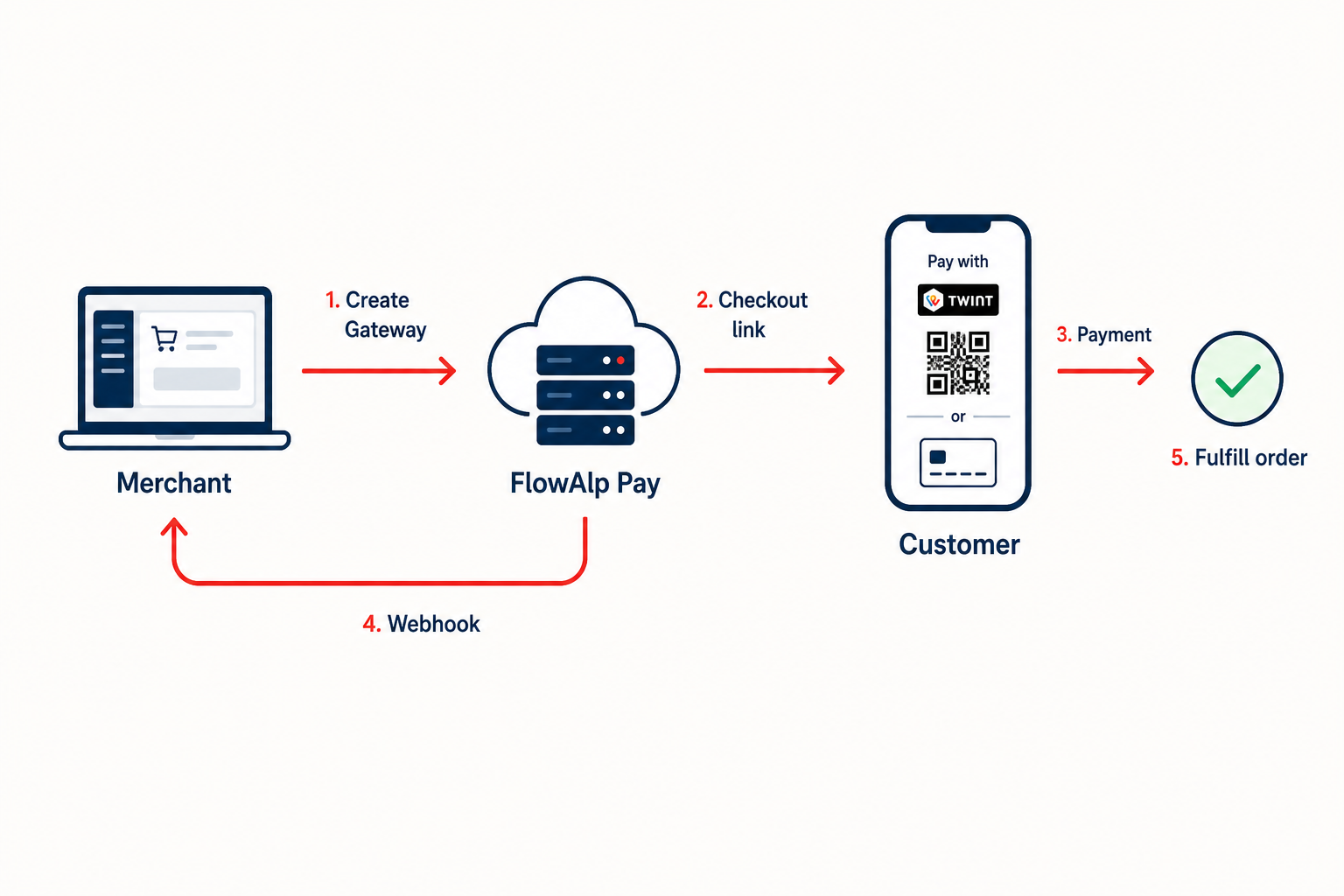
- Your backend creates a Gateway with amount, currency, redirect URLs and your order reference.
- You redirect the customer to the
linkreturned in the response — the hosted checkout on yourtenantname.pay.flowalp.compayment page. - The customer picks a payment method (TWINT, card, wallet, …) and pays.
- FlowAlp Pay sends a webhook to your server as soon as the transaction status changes.
- You verify the notification, then fulfill the order.
One-time is the default payment type, so no extra type parameter is needed. For pre-authorization, tokenization or subscriptions you add dedicated parameters — see those guides.
Create the Gateway
Send a POST request to the Gateway endpoint. Amounts are always expressed in the smallest currency unit (CHF 89.25 → 8925), and referenceId should carry your internal order ID so you can reconcile the payment later. Use API version v1.16.
curl -X POST "https://api.pay.flowalp.com/v1.16/Gateway/?instance=demo-shop" \
  -H "x-api-key: $FLOWALP_API_SECRET" \
  -H "Content-Type: application/json" \
  -d '{
    "amount": 8925,
    "currency": "CHF",
    "purpose": "Order ORDER-2026-1042",
    "referenceId": "ORDER-2026-1042",
    "successRedirectUrl": "https://shop.example.com/payment/success",
    "failedRedirectUrl": "https://shop.example.com/payment/failed",
    "cancelRedirectUrl": "https://shop.example.com/payment/cancel"
}'<?php
use FlowAlpPay\FlowAlpPay;
use FlowAlpPay\Models\Request\Gateway;
$client = new FlowAlpPay(
getenv('FLOWALP_TENANT'),
getenv('FLOWALP_API_SECRET'),
FlowAlpPay::DEFAULT_COMMUNICATION_HANDLER,
'pay.flowalp.com',
'1.16'
);
$gateway = new Gateway();
$gateway->setAmount(8925); // CHF 89.25 in minor units
$gateway->setCurrency('CHF');
$gateway->setPurpose('Order ORDER-2026-1042');
$gateway->setReferenceId('ORDER-2026-1042');
$gateway->setSuccessRedirectUrl('https://shop.example.com/payment/success');
$gateway->setFailedRedirectUrl('https://shop.example.com/payment/failed');
$gateway->setCancelRedirectUrl('https://shop.example.com/payment/cancel');
$response = $client->create($gateway);
$link = $response->getLink(); // send the customer hereThe response contains the Gateway id and a link. Store the ID with your order — you will need it to retrieve the Gateway later — and redirect the customer to the link. All parameters (VAT, basket, contact fields, validity, design profile, …) are documented in Create a Gateway.
Customer pays on the hosted checkout
On the hosted payment page the customer chooses one of the payment methods enabled on your account and completes the payment. You can narrow the choice for a specific payment with the psp and pm parameters — see Payment methods. Afterwards the browser is redirected to your success, failed or cancel URL. Prefer to embed the checkout instead? It also works in an iFrame or modal window.
The redirect alone never proves a payment. A customer can close the browser before the redirect, or open the success URL manually. Treat an order as paid only after server-side confirmation.
Confirm the payment server-side
FlowAlp Pay calls your webhook endpoint whenever the transaction status changes. A one-time payment is successful when the transaction reaches the status confirmed. Verify the webhook signature before trusting the payload, or confirm the status independently by retrieving the Gateway or the transaction via the API.
| Status | Meaning |
|---|---|
waiting | Checkout opened, payment not completed yet |
confirmed | Payment successful — safe to fulfill |
cancelled | Payment aborted by the customer |
declined | Payment declined (for example failed 3-D Secure) |
expired | Payment aborted due to inactivity |
Fulfill the order
- Match the notification to your order via
referenceId(or the stored Gateway ID). - Process each transaction exactly once — webhooks can be retried, so make your handler idempotent.
- Only then ship the goods, activate access, or mark the invoice as paid.
Ready to build? Follow the Create a Gateway reference for all parameters, run a test payment with the test cards, and complete the go-live checklist before switching to production.