

Payouts and reconciliation
July 30, 2026
Understand how FlowAlp Pay settles your funds: consolidated payouts, fees, bank statement references and reconciliation via API.
When a customer pays through FlowAlp Pay, the money does not land on your bank account immediately: it is first collected in your FlowAlp Pay balance and then transferred to you as a payout. This guide explains how that settlement works, what a payout contains, and how to reconcile payouts against your orders and your bank statement — manually in the dashboard or automatically through the API.
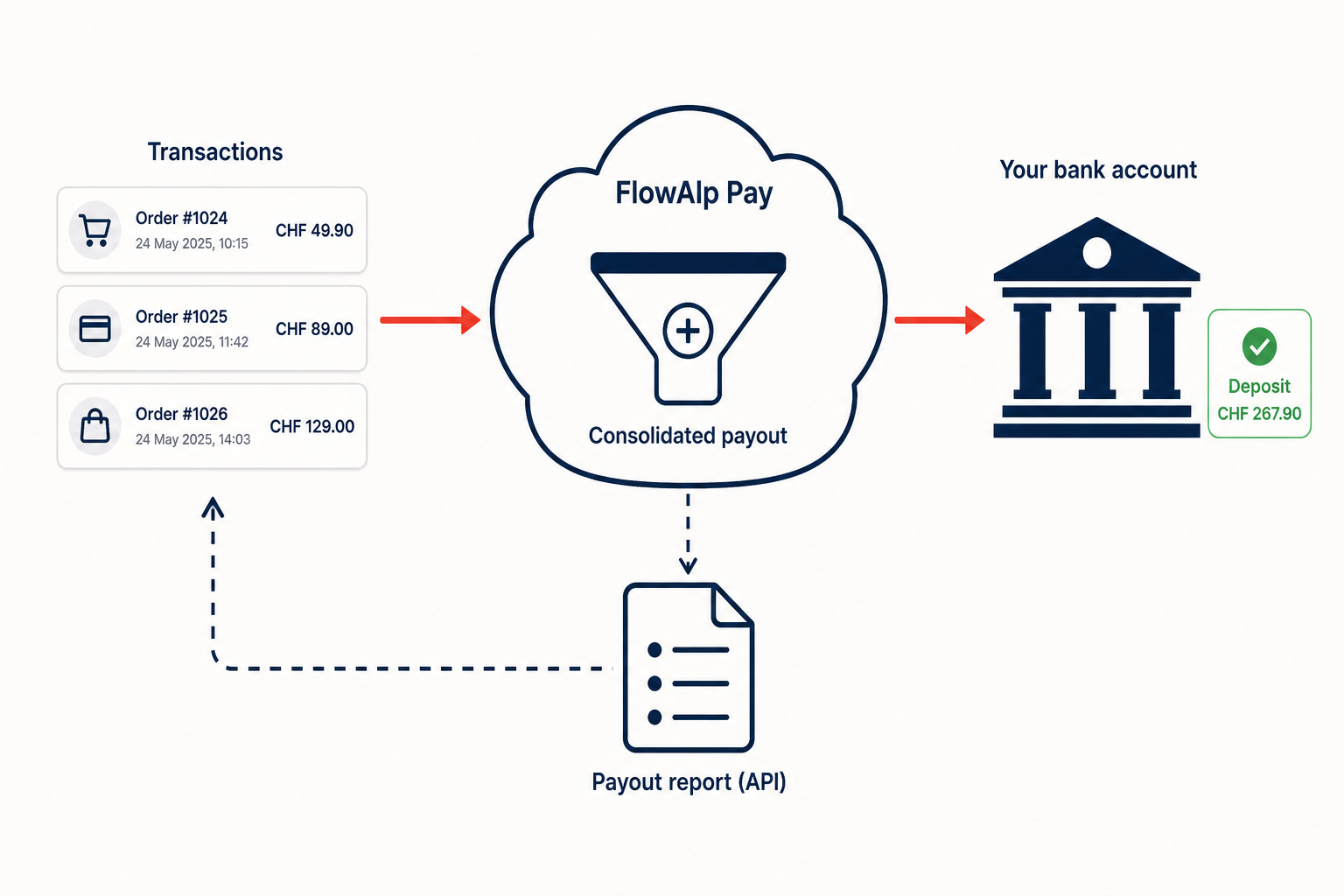
How funds settle
Every confirmed payment increases your balance by the transaction amount minus the transaction fee. At payout time, FlowAlp Pay bundles the accumulated activity into a single consolidated payout and transfers it to the bank account (IBAN) configured for your account. A payout therefore usually covers many transactions plus the related fee entries, and carries a statement text that appears on your bank statement, a payout date, a currency and the destination account details — everything you need to match the bank credit.
The payout lifecycle
| Status | What it means for you |
|---|---|
| initiated | The system has started preparing the payout. |
| pending | The payout is created and queued for processing. |
| under-review | The payout is being checked more closely before release. |
| processing | The payout file has been handed over for bank execution. |
| sent | The payout was transmitted to the bank — the credit should appear on your statement shortly. |
| failed | The bank returned the payout; the amount was not credited. |
What a payout contains
Inside a payout you find a list of transfers. Most entries are of type transaction: they carry the gross payment amount and the deducted transaction fee as separate items, plus the transaction's uuid and reference_id (your order number). Other transfer types cover payout fees, adjustments, disputes and reserves. All amounts are in minor units, and the items of a transfer always add up to its net amount — a CHF 300.00 payment with a CHF 3.00 fee is listed as 30000 and -300, contributing 29700 to the payout.
Reconcile payouts with your accounting
- List the payouts of the period with the Payouts API and pick the payout that matches the bank credit (same date, amount and
statementtext). - Load its transfers page by page via the details endpoint — a page size of 100 entries is recommended.
- Match every
transactiontransfer to an order in your system usingreference_idor the transactionuuid. - Book the fee items (
transaction-fee,payout-fee) separately, so gross revenue and charges stay distinguishable. - Verify that the sum of all transfers equals the payout
amountand the amount credited by your bank.
The link also works in the other direction: every settled transaction exposes a payoutUuid, so you can start from an order and find the payout that contained it — see List and retrieve Transactions. For manual checks, your FlowAlp Pay dashboard at https://pay.flowalp.com shows the same payout data.
curl "https://api.pay.flowalp.com/v1.16/Payout/C6B438B9/details?instance=<tenant>&limit=100&offset=0" \
  -H "x-api-key: <api-secret>"
Automate payout monitoring
Instead of polling, let FlowAlp Pay notify you: webhook notifications are sent when a payout reaches the statuses processing, sent or failed (no notifications are sent for initiated, pending or under-review). This is the easiest trigger to start an automated reconciliation run — see Configure webhooks.
Ready to implement? All endpoints, parameters and response fields are documented in the Payouts API reference.